
Setting activity types
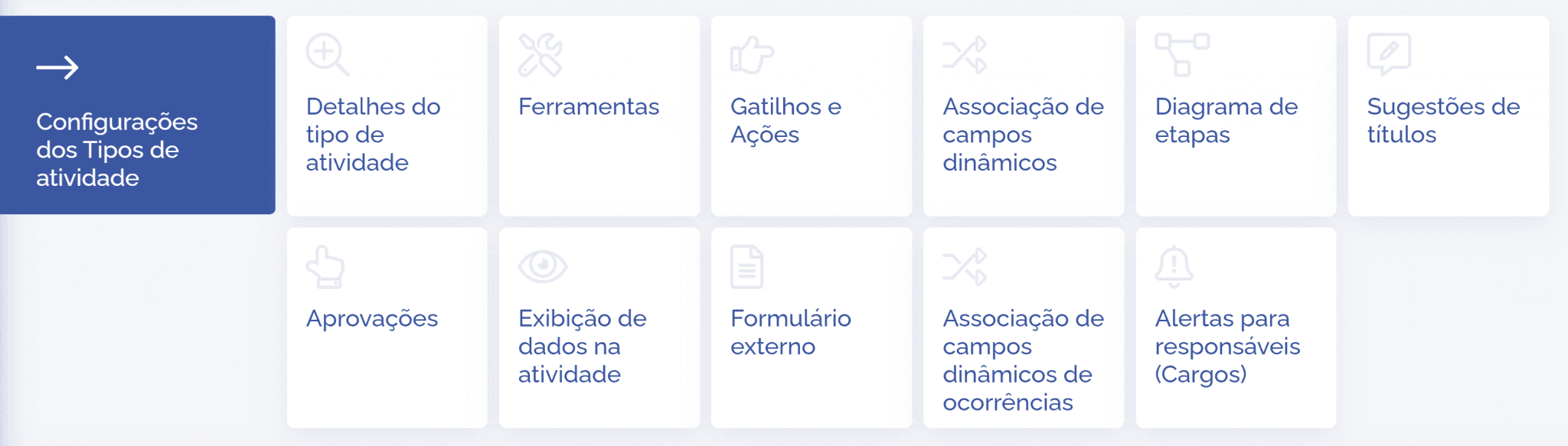
Various settings can be configured within each activity type. In this topic, a brief description of each setting will be presented. And in the next topics, we will go into the functional details.
Activity type details
In the Activity type details card, some fields are configurable and can be edited. In the fixed fields, it is possible to define which ones will be displayed or not, as well as define which ones will be required: from creation, from progress, or only at completion. It is also possible to configure the entire process of generating link types and alerts for: creator, watcher or responsible users. See more details in the Activity type details topic.
Tools
In the Tools card, it is possible to add features to activity types: Comments, Files, and History/Occurrences. See more details in the Tools topic.
Triggers and actions
In the Triggers and actions card, it is possible to create events and automatic actions in activity types through conditional triggers and stage-transition triggers. See more details in the Automations and actions topic.
Dynamic field association
In the Dynamic field association card, it is possible to add dynamic fields to activity types. As well as define which ones will be required: from creation, from progress, or only at completion. It is also possible to define whether the field will be displayed or hidden when creating the activity. In addition to adding conditionals by stage and by alternatives. See more details in the Custom field association topic.
Stage diagram
In the Stage diagram card, it is possible to add stages to activity types. In addition to editing the ordering of the operational flow. See more details in the Stage diagram topic.
Title suggestions
In the Title suggestions card, it is possible to add titles to activity types. See more details in the Title suggestions topic.
Approvals
In the Approvals card, it is possible to add and configure approval types (request, reject, and approve) in activity types. In addition to defining an expiration period. See more details in the Approvals topic.
Data display in the activity
In the Data display in the activity card, it is possible to add unit fields to activity types. See more details in the Data display in the activity topic.
External form
In the External form card, it is possible to enable a URL and configure the fields to be displayed on the form in activity types. See more details in the External form topic.
Occurrence dynamic field association
In the Occurrence dynamic field association card, it is possible to add occurrence fields to activity types. See more details in the Occurrence dynamic field association topic.
Alerts for responsible users (roles)
In the Alerts for responsible users card, it is possible to edit the role, configuring its display features in activity types. See more details in the Alerts for responsible users (roles) topic.