
System field configuration
In Activity type details in the Fixed field settings section, it is possible to define field requirement and display.
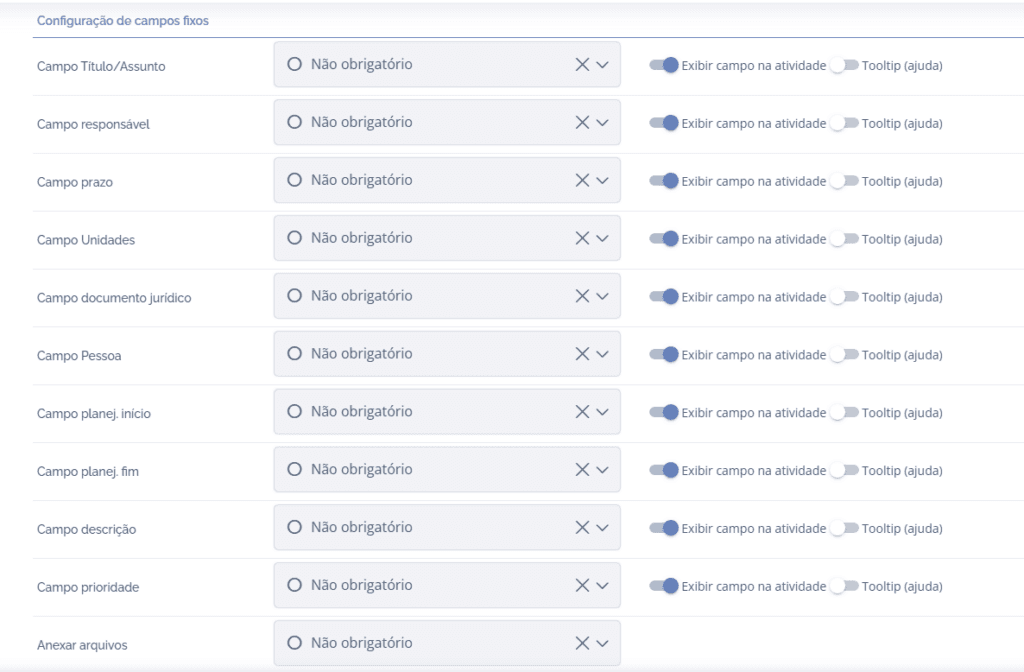
Field requirement
By clicking Select… for the desired fixed field, you can choose four options:
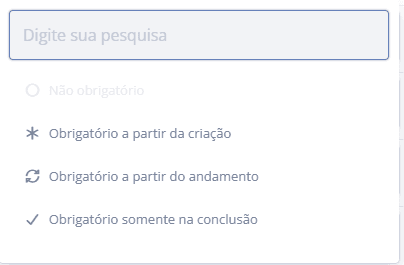
Not required: when selecting this option, filling in this field will not be required.
Required from creation: when selecting this option, filling in this field will be required at creation.
Required from progress: when selecting this option, filling in this field will be required from progress onward.
Required only at completion: when selecting this option, filling in this field will be required only at completion.
Important: the Title field is required from creation, and this cannot be changed.
Field display
For fields that contain this icon, Display field in activity, it is possible to define whether the field will be shown or hidden in the activity:

If any field is set as hidden, the requirement options will be disabled.
Tooltip
When enabled, it is possible to add helper text for the field in question.
